Cosmo JrTrack PRO: a kids watch instead of a smartphone
Best for: Cosmo aims this at about ages 6 to 12: kids who are starting to move around without you, when a locked-down call-and-locate watch is enough.
The Cosmo link on this page is an affiliate link. If you buy through it, I may earn a commission at no extra cost to you.
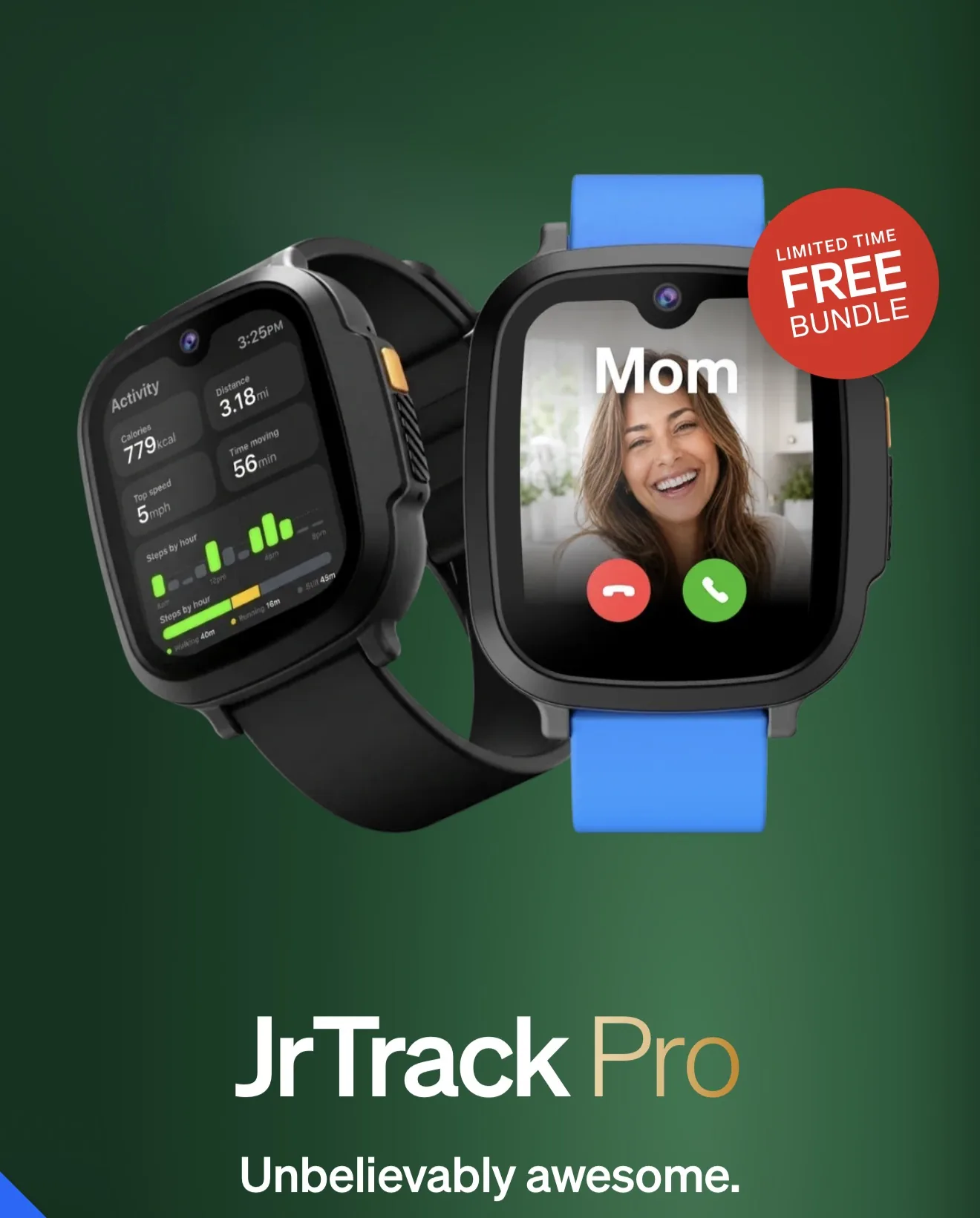 Opens in a new tab.Check today's price at Cosmo Opens in a new tab.

Ryan Fields-Spack, former fire captain, 20+ years as a paramedic, dad of three
You're not ready to give your kid a smartphone, but you still need them to reach you.
We have been using the JrTrack SE with our kid Bromley for about four months. This is my first look at the PRO, and why I am moving him to it.
This is not a long-term review of the PRO yet. I will come back after he has worn it.
Cosmo is a Denver-based company. They reached out in the summertime and provided the JrTrack PRO free for this review. They are not paying me for the review, and the opinions here are mine.
The Cosmo link on this page is an affiliate link. If you buy through it, I may earn a commission at no extra cost to you.
The watch on this page
I am not listing a dollar amount. Check the current price. This page is not a kit grade.
| Product | Price | Who it is for | Key feature | Link |
|---|---|---|---|---|
| Cosmo JrTrack PRO | check current price | Cosmo aims this at about ages 6 to 12: kids who are starting to move around without you, when a locked-down call-and-locate watch is enough. | This is a standalone watch your child can use to reach other people. | See the JrTrack PRO on Cosmo's site Opens in a new tab. |
01 · Who this is for
What it is
Both watches do the same core job. This is a standalone watch your child can use to reach other people. Location is GPS-based through the Cosmo app. It does not have social media, and it does not have access to the open internet. The child does not need a smartphone. A parent does need a phone for the app.
Cosmo aims this at about ages 6 to 12: kids who are starting to move around without you, when a locked-down call-and-locate watch is enough.
It requires a Cosmo Membership. It is not a bring-your-own-carrier watch. Coverage depends on Cosmo Mobile where you live, so check that before you commit.
02 · Reason 1
A connection without a smartphone
Your kid can send a real text from a real number. You approve the contacts in the Cosmo app. Grandparents do not need a special app. They text from their regular phone.
Papa Kim is always texting Bromley on the SE, and I have only got about three contacts on that watch. We will do the same on the PRO.
You can send photos and short videos, and join group chats with people you have approved. Parents can review those messages in the app. Video calling is not supported on either model, which is fine with me.
Where the PRO pulls ahead is the screen. The SE has a 1.4 inch LCD. The PRO has a larger OLED screen, about 1.78 inches. The bezels are thinner, which helps with typing, and a full keyboard fits. The camera steps up from 2 megapixels on the SE to 5 megapixels on the PRO.
03 · Reason 2
You decide who gets through
Only contacts you approve can call or text the watch. Unknown numbers are blocked, on both models.
There is no open internet browser, no social media, no YouTube, and no open app store. Extra apps come from Cosmo's App Station, things like Spotify Kids and a couple of learning apps, with time limits you set. Your child cannot just download whatever they want.
04 · Reason 3
Knowing where they are, without guessing
This is one of the key things I wanted for Bromley, because he is out mowing and I still want to give him freedom. Location runs through Cosmo's HaloGPS in the parent app on both watches. You can draw safe zones and get arrive and leave alerts.
Cosmo's docs say that, by default, the watch checks in every 30 minutes between 7 and 7, unless you change it. You can tighten that, or use live tracking when you need a closer look.
Treat GPS as a tool, not a guarantee. Cosmo notes there is no wear detection: the map shows where the watch is, not whether it is on the wrist.
I have tested the tracking on the SE, and it is really good. I was able to find Bromley at a mall when we were in different stores.
On the PRO, Cosmo says live tracking updates every second. On the SE, that live view is every five to ten seconds. I have not run a long-term test on the PRO yet. I am sticking to Cosmo's public specs here, and what we already know from the SE.
05 · Reason 4
School and everyday routines
School-Fi is on both models. If the watch is on campus during school hours, it can lock down distractions at the level you choose: full, partial, or unrestricted. We do not send Bromley's watch to school, but the mode is there.
SOS still gets through during a school routine. 911 calling is not available in a fully restricted routine, so if you enable 911, set that thoughtfully.
There is basic step tracking in the app, plus alarms on the watch. That is fine for habits, not medical advice.
On the SE, Bromley uses the alarms for real tasks every day. He started a mowing business, and he set a reminder every other day to water a neighbor's house. He set that up on his own.
06 · Reason 5
The PRO is built to get worn
The SE works, and we love it, but it is a thicker watch. The PRO is about 12.8 millimeters thick. The SE is about 15.8. Cosmo calls that roughly 19% thinner, and you can see the difference side by side.
Cosmo rates the SE battery at about 18 to 24 hours in typical use, and the PRO for up to about two days at default settings. I am not inventing that number from a test. I will report what I actually get after living with it.
The PRO has a redesigned speaker and amplifier for clearer calls. The speaker on the SE was a little tough to hear. The PRO also has more storage: 32 GB, compared with 8 GB on the SE.
Cosmo gives the PRO a higher official water rating than the SE. I am still going to treat it as splash resistant. I am not going to have them shower or go swimming with the watch.
07
JrTrack SE vs JrTrack PRO
The SE column includes what we have already used at home. The PRO column mixes what I can see and feel from the unboxing with Cosmo's published specs. I have not finished a long-term wear test on the PRO.
Swipe the table sideways to compare the SE and the PRO.
| Feature | JrTrack SE | JrTrack PRO |
|---|---|---|
| Core job | Standalone watch, approved contacts, GPS, no social media | Same core job |
| Screen | 1.4 inch LCD | About 1.78 inch OLED, thinner bezels |
| Typing | A tighter keyboard | A full keyboard fits |
| Camera | 2 megapixels | 5 megapixels |
| Thickness | About 15.8 mm | About 12.8 mm. Cosmo calls that roughly 19% thinner. |
| Battery, Cosmo ratings | About 18 to 24 hours in typical use | Up to about two days at default settings. Not a test result from me. |
| Live tracking, Cosmo says | Every five to ten seconds | Every second. I have not long-term tested this. |
| Storage | 8 GB | 32 GB |
| Calls | The speaker was a little tough to hear, in my use | Redesigned speaker and amplifier |
| Water | A lower official rating | A higher official rating. I still treat it as splash resistant. |
08
Setup
Setup is straightforward. Charge it, install the Cosmo Family Connection app, create your parent and child profiles, pair the watch, join Wi-Fi, add approved contacts, and make a test call before you rely on it.
You choose a Cosmo service plan, then the watch connects to the cellular network. Cellular can take time to come fully online, so a calm evening or weekend setup helps.
09 · Read this carefully
SOS and 911
A watch is a tool, not a babysitter. It does not replace adult judgment, good habits, or calling emergency services when someone is in danger. In an emergency, call 911.
SOS does not call 911. Cosmo's user guide is explicit: SOS alerts you and every Guardian on the account and starts live tracking.
On the PRO, the child holds a side button for about five seconds, then there is a silent countdown of about 15 seconds so they can cancel a mistake. If you call the watch while SOS is active, Cosmo says it can answer silently so you can listen.
911 calling is separate, and it is off by default. You turn it on in the app when you decide your child is ready, and there is a confirmation step.
Practice the real buttons with your kids in a calm moment. Do not learn this for the first time in a crisis.
Original JrTrack SE review
10
My first look
Bromley has loved the SE. I am impressed with the PRO from this first look, and I think this upgrade is going to change things.
We are going to get Bromley wearing it, and I will come back with more specific details.
Would you give your kid this watch, or a phone?
11
Questions I'd ask before buying
Does SOS call 911?
No. SOS does not call 911. It alerts every Guardian on the account and starts live tracking. 911 calling is a separate setting, and it is off by default.
Is 911 on when I set the watch up?
No. You turn 911 calling on in the app when you decide your child is ready. There is a confirmation step. 911 calling is not available in a fully restricted school routine.
Does my child need a smartphone?
No. The child does not need a smartphone. A parent does need a phone for the Cosmo app.
Should I get the SE or the PRO?
Both do the same core job. I am moving Bromley to the PRO because it is thinner, the screen and keyboard are easier to use, the camera and storage are better, and Cosmo rates the battery and live tracking higher. I have not finished a long-term wear test on the PRO yet.
Can they swim with it?
I treat it as splash resistant. I am not going to have them shower or go swimming with the watch.
Is this a paid review?
No. Cosmo provided the JrTrack PRO free for this review. They are not paying me for the review, and the opinions here are mine. If you buy through my Cosmo link, I may earn a commission at no extra cost to you.